

Jer Carlo Catallo
Posted on March 12, 2026 • 6 min read
Apply Zero Trust on AI Chatbots: The Developer's Guide to Prompt Security
A comprehensive, practical guide for developers on exactly what data must never be shared with AI chatbots like Gemini or ChatGPT, and how to apply Zero Trust to lock down your privacy settings.
Apply Zero Trust on AI Chatbots: The Developer's Guide to Prompt Security
Over my six years as a full-stack developer, I’ve found that AI chatbots are undeniable force multipliers. They save us countless hours of documentation hunting and boilerplate typing. Among the tools available, Google Gemini is my primary AI assistant. I rely on it daily because it is backed by Google’s world-class engineering and a security infrastructure that is arguably among the most mature in the industry.
However, even when using a platform as reliable and robust as Gemini, the balance of speed versus safety remains a constant friction. No matter how much I trust a provider’s architecture, professional due diligence is non-negotiable.
The solution to this friction is adopting a "Zero Trust" mindset. In networking, Zero Trust means never trust, always verify. For developers, it means applying that same rigorous standard to our own clipboards. Even within a trusted ecosystem, you must treat every prompt as a potential data disclosure event.
Just like in chess, you have to think three moves ahead before you commit to a play. Pasting massive chunks of context without a review is like leaving your king unguarded. If you use these tools every day, the single most critical habit you can build is a strict mental filter: Assume the platform is secure, but act as if the prompt is public.
The Fast Rule: Assume Hostile Exposure
In a Zero Trust environment, you assume a breach is always possible. The fast rule for AI is simple: never paste information that could damage your users, your company, or your own career if it ends up in a training dataset. Tutorials rarely talk about this dirty reality, but professional engineering demands strict governance over your clipboard. We need to be exhaustive about what stays local.
1. Hardcoded Secrets and Cryptographic Keys
When I spend my weekends practicing on TryHackMe, the absolute quickest way to compromise a target machine is by finding abandoned, hardcoded credentials. External chatbots are no different. They are third-party servers, and you cannot treat them like your local .env file.
Do not paste:
- Cloud provider credentials (AWS IAM keys, GCP service accounts)
- Payment gateway secrets (Stripe, PayPal secret keys)
- Unsigned or signed JSON Web Tokens (JWTs) that contain sensitive payloads
- Private SSH keys or SSL/TLS certificates
- Database passwords and raw connection strings
- CI/CD pipeline tokens (GitHub Actions, GitLab CI secrets)
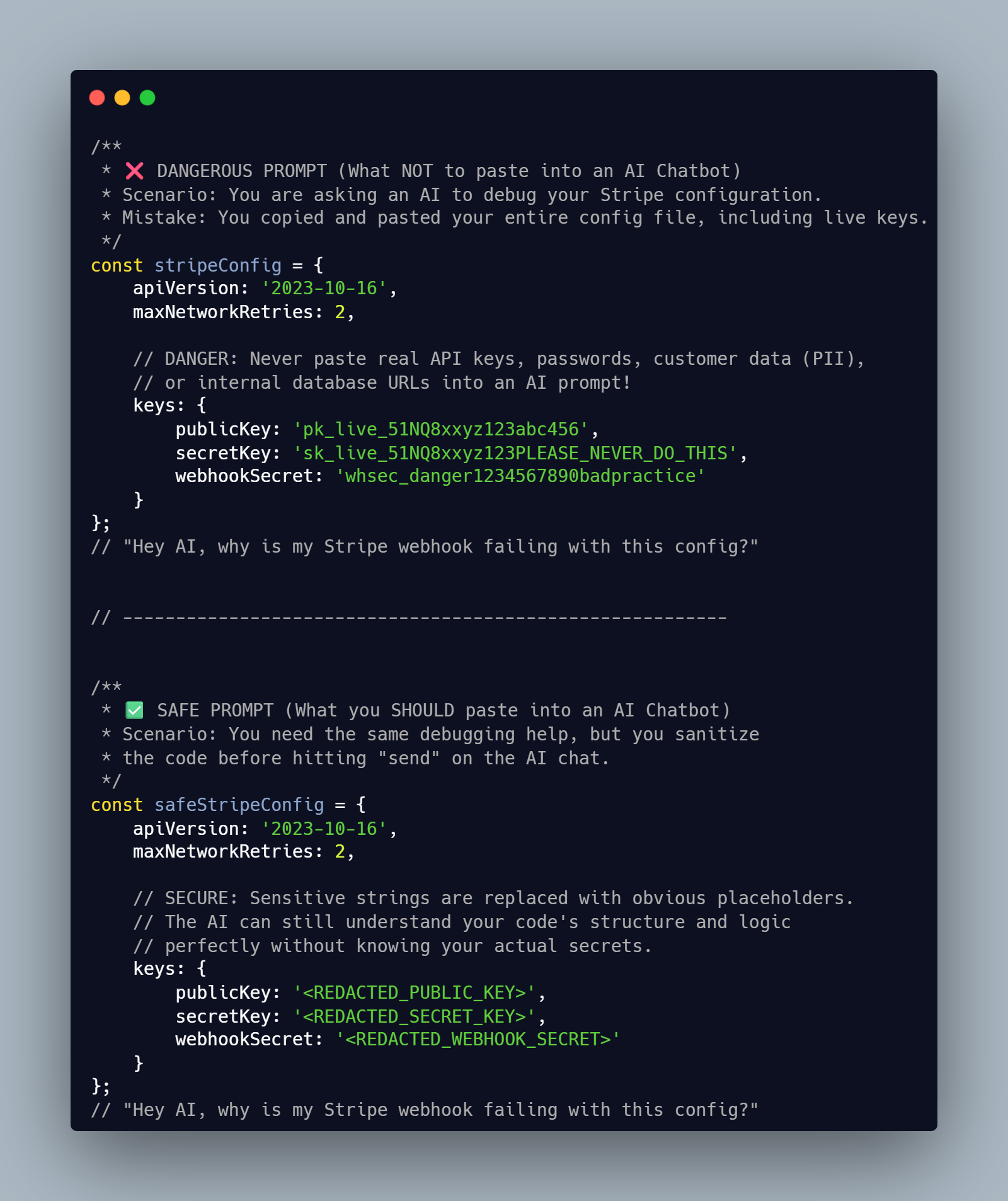
For example, if you are struggling with a database connection timeout at 2 AM, it is highly tempting to just paste your entire configuration object to let the AI spot the typo. Do not do it. If an external chatbot sees a live credential, you must assume it is fully compromised. Rotate it immediately.
2. Personally Identifiable Information (PII)
Data privacy is not just a legal requirement. It is a fundamental trust you build with your users.
For instance, if you are building an application for local dog owners and you need to debug a complex search algorithm, do not paste real vet records or user addresses into the prompt.
Do not paste:
- Full names paired with emails or physical addresses
- IP addresses and browser fingerprinting data
- Device IDs or mobile advertising identifiers
- Precise geolocation coordinates
- Raw support tickets or chat transcripts that include user complaints
- Financial, medical, or demographic data of any kind
Always generate and use synthetic test data instead. Protect your users.
3. Proprietary Architecture and Internal Infrastructure
I think we often forget that our code's structure can be just as sensitive as the data it processes. Theory says you can just paste your architecture to get optimization tips. Reality dictates that exposing your internal network topology is a massive security risk.
Do not paste:
- Internal IP spaces and private DNS routing names
- Mermaid.js diagrams or plantUML code of your proprietary cloud architecture
- Unreleased product features, M&A plans, or internal roadmaps
- Source code that reveals unpatched zero-day vulnerabilities in your systems
- SEO strategies or proprietary ranking algorithms
- Client lists or vendor negotiation contracts
Guard your infrastructure.
4. Raw System Output, Memory, and Logs
Finding a specific bug in a massive production log is a lot like stargazing in a heavily light-polluted city. You have to filter out the massive amounts of noise to see the stars that actually matter. Blindly pasting a raw log dump is incredibly dangerous.
Do not paste:
- Core memory dumps (these frequently contain plaintext passwords and session cookies)
- Full authentication or authorization server logs
- Raw request and response bodies from production traffic
- Stack traces that reveal your server's entire internal directory structure
- Your
.bash_historyor terminal command logs
Extract only the minimum, non-sensitive snippet required for the AI to understand the logic failure. Scrub your logs.
The Zero Trust Workflow: Always Verify
Step 1. Minimize
Share only what is strictly necessary to solve the task at hand. Most debugging requires a tiny, isolated, reproducible sample rather than your entire system architecture.
Step 2. Redact
Replace sensitive fields manually before hitting enter.
john.doe@company.combecomesuser@example.comsk_live_12345becomesAPI_KEY_REDACTED- Real hostnames become
internal-service.local, etc.
Step 3. Abstract
If possible, describe the structure and behavior instead of sharing raw values. For me, this is exactly like composing MIDI music. You do not need to share a massive, uncompressed WAV file to get feedback on a melody. You just share the notes, the velocity, and the tempo. Give the AI the abstract logic, not the raw data.
Step 4. Verify Output
Treat all generated code as entirely untrusted until you personally review it. Security vulnerabilities often hide in code that appears to compile and work perfectly. Validate everything.
Lock Down Default Permissions
Policies differ wildly by provider. Free consumer plans rarely follow the same strict data retention rules as enterprise API contracts. You need to actively manage your privacy settings to ensure your prompts do not end up in the next model update.
If you use Google Gemini, for example, your conversations might be reviewed by human annotators or used to train future models by default. You can fix this right now:
- Open your Gemini web interface.
- Click on "Activity" (usually located in the bottom corner or side navigation menu).
- Look for the "Gemini Apps Activity" dropdown menu.
- Select "Turn off" to stop saving future chats, or select "Turn off and delete activity" to wipe your history as well.
For ChatGPT, the process is similar. You can navigate to your Settings, go to the Data Controls tab, and explicitly toggle off the "Chat history & training" option.
Always read the official privacy documentation for the specific tool you are using today. Never assume a default setting is designed for your compliance requirements. Verify the settings, lock them down, and keep your data strictly private.
A Practical Rule You Can Adopt Today
Use this simple baseline for yourself and your team: "No raw secrets, no real customer data, no internal infrastructure details, and no raw system logs in external AI chatbots. Redact first, then prompt."
AI tools are incredible for career growth, learning, and daily productivity. But responsible, senior engineers pair that incredible speed with strict security habits. Protect your data. Redact aggressively. Ship safely.
Over to You
What is the one piece of sensitive data you almost accidentally pasted into a chatbot, and how did you catch yourself?
Photo Credits:
Photo by Markus Winkler: https://www.pexels.com/photo/scrabble-tiles-form-words-google-and-gemini-30869081/